
Access Code: Overview
The Access Code step turns your workflow into a gated experience. Guests must enter a valid numeric code before they can continue, so only people with the right code can load the rest of the workflow. Use Access Codes for VIP flows, paid sessions, private events, staff-only modes, or special promotions.
What Is the Access Code Step?
Access Code is a feature step in the Workflow Builder that blocks the flow until a correct code is entered.
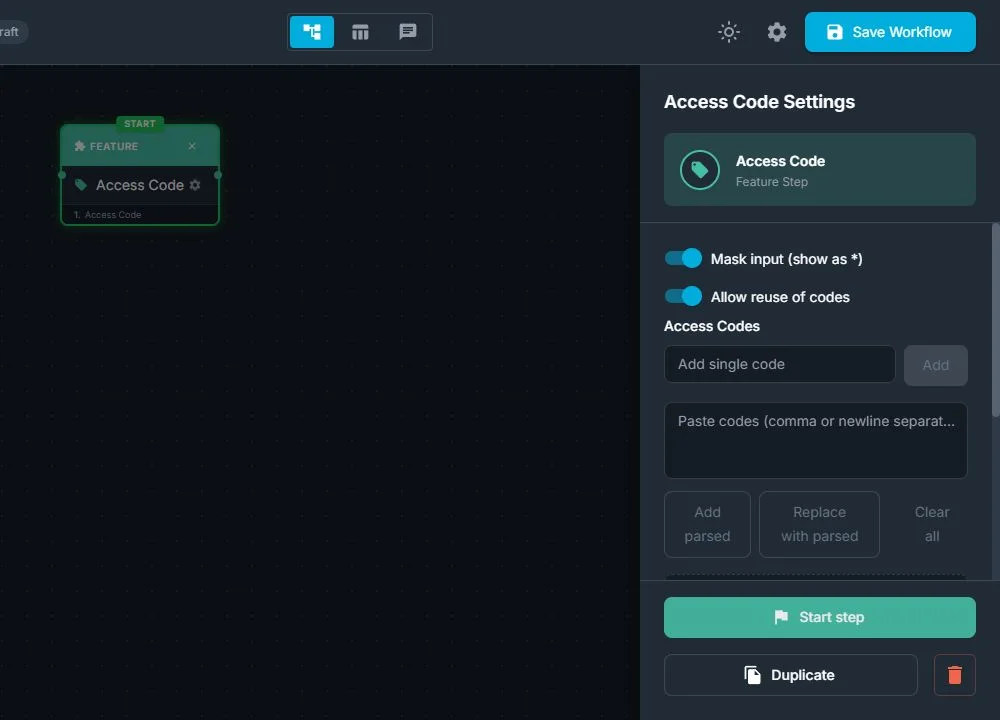
From the workflow point of view, Access Code:
- Pauses the workflow and shows a simple numeric entry screen
- Checks what the guest entered against the codes you defined for this workflow
- Lets the flow continue only when the code is valid
- Can treat codes as reusable (can be used many times) or one-time (marked as used after the first success)
- Can show digits normally or mask them (for example, as ***) for more privacy
From the guest's point of view:
- They see a keypad or code entry screen and are asked to "Enter access code"
- They type their numeric code and confirm
- If the code is valid, the booth immediately continues to the next step in the journey
- If the code is invalid, they see an error message, the input clears, and they can try again
- There is no built-in limit on attempts: they stay on this screen until a valid code is entered or the operator exits the step from the control side
When Should You Use Access Codes?
Use an Access Code step whenever you want to control who can reach a specific part of the experience, or to link access to tickets, payments, or specific groups.
Typical reasons:
- VIP or premium experiences: only guests with a code can enter a special or upgraded flow
- Private events: limit use of the booth to invited guests who received a code
- Paid sessions: guests receive a code after paying, and use it to start or unlock their session
- Sponsor activations: sponsors distribute codes that unlock a branded experience or extra feature
- Staff-only flows: operators use codes to reach test, setup, or maintenance workflows that guests should not see
- Contest or prize flows: only winners receive a code that loads a prize or bonus experience
You usually do not need Access Codes for:
- Open, walk-up booths where anyone can use the experience
- Simple brand activations that are fully public
- Quick, low-risk experiences where access is not restricted
How Access Code Fits in the Workflow
In the Workflow Builder, you add and set up the Access Code like any other step.
- Select Access Code in the Steps Library
- Enter one or more numeric codes that should be accepted for this experience
- Choose whether codes are reusable (can be entered many times) or one-time (marked as used after first success)
- Decide if the input should be masked so digits appear as *** while the guest types
When the workflow reaches the Access Code step:
- The flow stops, and the code entry screen appears
- The guest types a code using the on-screen numeric keypad
- The system checks if the code matches one of your configured codes (and, if one-time, that it has not been used already)
- If the code is accepted, the workflow automatically continues to the next connected step
- If the code is not accepted, the guest sees an error, the input is cleared, and they stay on the same screen to try another code
Access Code is usually placed near the start of a workflow, or just before a premium branch that you want to protect.
Typical Use Cases
1. Fully Gated Experience
Only guests with a valid code can use the booth at all.
Example flow:
Access Code → Selection Screen → Take Photo → Preview → Print
Everyone sees the access screen first. Guests without a code cannot continue; guests with a code enter it and then see the full experience.
2. Welcome Then Gate
Show branding to everyone, but continue only for guests with a code.
Example flow:
Welcome → Access Code → Take Photo → AI Effect → Share
The welcome screen is open. After that, only guests who enter a valid code move forward into capture and AI.
Why Access Codes Are Useful
For event operators:
- Clear control: only guests with approved codes can load the experience or specific branches
- Flexible configuration: you can use a single shared code for a group, or many one-time codes for individual tickets or prizes
- Simple management: codes are configured in one place inside the workflow and can be updated per event
For clients and brands:
- Professional, controlled experience: access feels managed and intentional, not random
- VIP and exclusivity: guests with codes feel special and invited in to a private or upgraded journey
- Better brand protection: only authorized guests can reach certain branded content or premium effects
Was this helpful?
Related articles
FMX for Windows: Customizing Your Experience
Everything at a photo booth event (the overlays, the countdown, the on-screen text, the email guests receive, the gallery they get a link to) is something you control. This guide m
FMX for Windows: System Requirements
Before installing FMX on your Windows computer, make sure your system meets the requirements below. Meeting the recommended specifications will ensure smooth performance during eve
Installing FMX on Windows
When to Use First-time installation of FMX on a Windows PC Reinstalling FMX on the same machine Upgrading FMX to a newer version using the latest installer Requirements Windows 10
Login to FMX
When to Use Immediately after installing FMX When switching operators or moving the license to a different PC Requirements A Foto Master Cloud Account (email and password) At least
Building a FMX Preset From Scratch: Video Tutorial
This video covers the basics of building a workflow and layout in FMX: a good starting point before exploring the individual workflow step articles.