
Disclaimer: Overview
The Disclaimer step shows guests clear terms and conditions before they use your experience. Use it to request consent (for photo usage, data collection, or marketing) and decide what happens if a guest agrees or disagrees.
What Is the Disclaimer Step?
Disclaimer is a feature step in the Workflow Builder that blocks the journey until the guest handles your terms.
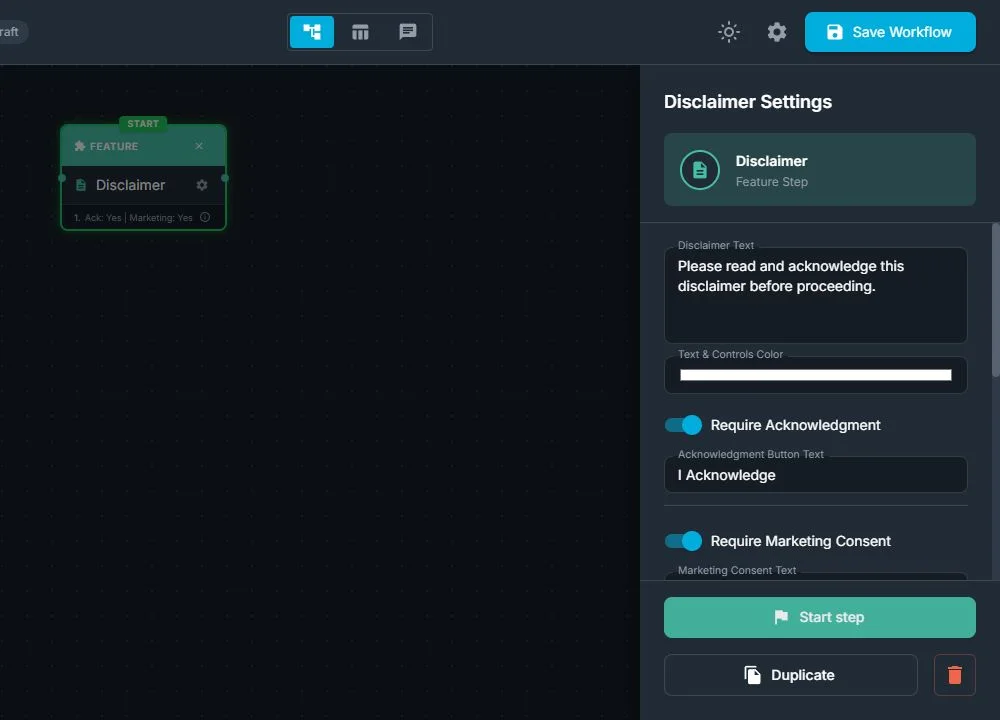
From the workflow point of view, the Disclaimer step:
- Loads a full-screen message with your text (terms, consent, rules, waiver, age gate, etc.)
- Lets you require an acknowledgment checkbox (for example: "I have read and agree")
- Allows you to optionally add a separate marketing consent checkbox (for example: "I agree to receive promotional emails")
- Shows an Agree button to move forward in the experience
- Can optionally show a Disagree button that sends guests to a different step you choose
You can customize:
- The main disclaimer text
- The labels of all buttons (Agree / Continue / I Do Not Agree, etc.)
- The labels of the acknowledgment and marketing checkboxes
- The color of the text and controls so that the screen matches your branding
From the guest's point of view:
- When the workflow reaches Disclaimer, they see a clear screen with your terms or message
- They may be asked to tick a checkbox such as "I have read and agree"
- They may see an extra checkbox for marketing consent
- They tap Agree to continue to the next step in the experience
- If a Disagree button is visible, they can tap it and be sent to an alternative screen (for example, Thank you or end of session)
- They cannot continue into the main experience until they have done whatever is required on this screen
When Should You Use a Disclaimer?
Use a Disclaimer step whenever you need guests to agree to something important before they can continue.
Typical reasons:
- You want permission to use their photos or videos in marketing or social media
- You need to display terms and conditions for a contest or campaign
- You must show privacy or data usage information
- You need guests to confirm they are over a certain age (for example, 18+)
- You want a clear liability waiver for activities that involve some risk (jumping, dancing, using props, etc.)
- You want explicit marketing consent before sending emails, newsletters, or SMS
You usually don't need a Disclaimer for:
- Very simple, open, low-risk experiences
- Flows where no personal data is stored and no special permissions are required
How Disclaimers Fit in the Workflow
In the Workflow Builder, add a Disclaimer step like any other step:
- Select Disclaimer in the Steps Library
- Enter your disclaimer text (terms, consent, rules, age notice, etc.)
- Decide whether to require an acknowledgment checkbox (must be checked before continuing)
- Ask for marketing consent with a separate, optional checkbox
- Show or hide the Disagree button
- Change the button and checkbox labels to match your language and tone
- Adjust colors so the screen fits your event branding
- If you show a Disagree button, choose which step to load if guests tap it (for example, Thank you or a neutral information screen)
- Connect the Disclaimer step to the steps before and after it, like any other step
At runtime, the Disclaimer step:
- Appears as a regular, numbered step in the flow
- Loads your text, checkboxes, and buttons when the workflow reaches it
- Waits until the guest fulfills all required actions (for example, checks "I have read and agree") and taps Agree, or taps Disagree, if available
- Then automatically continues either to the normal next step (after Agree) or to the alternative step (after Disagree)
Typical Use Cases
1. Photo Usage and Rights
Let guests know you may use their photos for marketing or social media, and get clear permission first.
Example flow:
Welcome → Disclaimer (photo usage) → Take Photo → AI Effect → Preview → Share
2. Age or Eligibility Check (18+)
Make sure only eligible guests use a branded or age-restricted experience.
Example flow:
Brand Intro Screen → Disclaimer (age 18+) → Take Photo → Layout → Print
Why Disclaimers Are Useful
For event operators:
- Legal and compliance support: helps you present and log clear consent for photo usage, data collection, age confirmation, and risk acceptance
- Clear expectations: guests know exactly what they are agreeing to before using the booth or experience
- Flexible flows: you choose what happens when someone disagrees: end the session, route them to a neutral screen, or let them continue without certain extras
- Per-event customization: you can update the disclaimer text, checkboxes, and button labels per client, brand, or location without changing the rest of the workflow
For clients and guests:
- Transparency: guests see how their images and information will be used, before anything happens
- Control: they can decide whether to agree and continue, or decline if they don't feel comfortable
- Professional look: a clear, well-designed disclaimer screen gives the experience a serious, trustworthy feel
Was this helpful?
Related articles
FMX for Windows: Customizing Your Experience
Everything at a photo booth event (the overlays, the countdown, the on-screen text, the email guests receive, the gallery they get a link to) is something you control. This guide m
FMX for Windows: System Requirements
Before installing FMX on your Windows computer, make sure your system meets the requirements below. Meeting the recommended specifications will ensure smooth performance during eve
Installing FMX on Windows
When to Use First-time installation of FMX on a Windows PC Reinstalling FMX on the same machine Upgrading FMX to a newer version using the latest installer Requirements Windows 10
Login to FMX
When to Use Immediately after installing FMX When switching operators or moving the license to a different PC Requirements A Foto Master Cloud Account (email and password) At least
Building a FMX Preset From Scratch: Video Tutorial
This video covers the basics of building a workflow and layout in FMX: a good starting point before exploring the individual workflow step articles.