
Original vs. Generic Toner for the Retro Newspaper Booth
The Retro Newspaper Booth prints every newspaper on a laser printer, so the toner cartridge you use directly affects how each print looks. Use only original toner cartridges made by your printer’s manufacturer. Generic, no-brand cartridges may cost less, but they print darker and can leave parts of the guest’s photo missing from the final newspaper. Small details guests see on the iPad mini screen may not appear on the printed newspaper.
Original Manufacturer Toner
Original toner is made for your printer and keeps the full range of tones in the newspaper photo, from light gray to deep black.
Print yield: An estimated 1,000 to 1,200 prints before the cartridge needs to be replaced.
Image quality: Clear detail in dark areas such as suits, hair, shadows, and background crowds.
Best for: Every Retro Newspaper Booth event.
Note: The print yield is an estimate, not a guaranteed number of prints per cartridge.
Original toner gives you consistent, predictable results on every print.
Generic (No-Brand) Toner
Generic toner prints noticeably darker than original toner. When a print is too dark, shadows and dark clothing fill in as solid black, and details in those areas are lost from the image.
Image quality: Darker prints, with parts of the image missing in shadows and dark areas.
This matters most to your guests. Guests see their photo on the iPad mini before it prints, including small details such as the texture of their clothing, strands of hair, and people in the background. With generic toner, many of those details can disappear from the printed newspaper. The print no longer matches what the guest saw on the screen, and the guest experience suffers.
Generic toner is not recommended for the Retro Newspaper Booth.
Side-by-Side Comparison
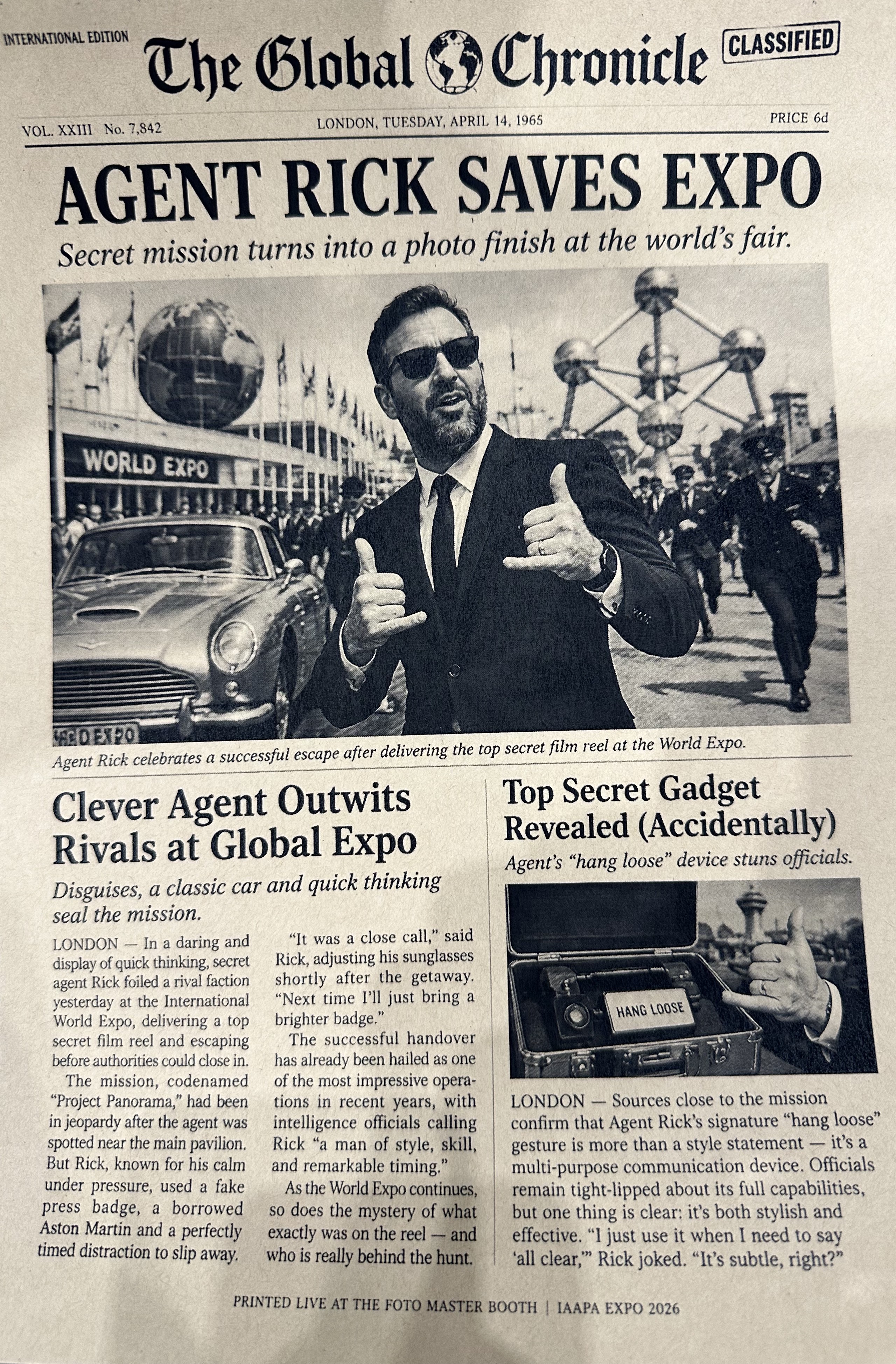
The two prints below use the same newspaper template and the same guest photo. The only difference is the toner.
Generic toner: The suit jacket prints as a solid black shape, and the people in the background and the details on the car blend into the dark areas.
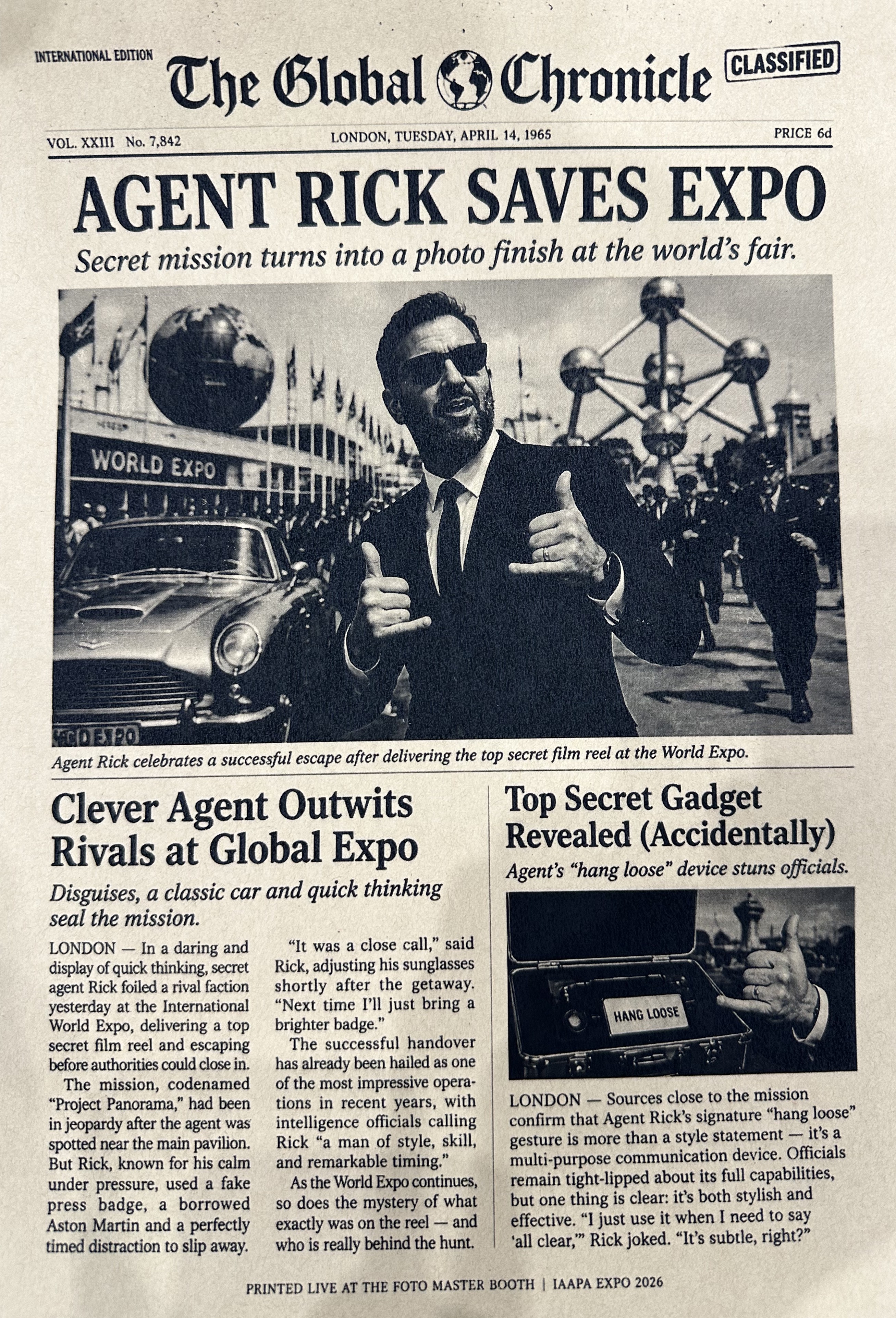
Original toner: The folds and lapels of the suit stay visible, and the background crowd and the car keep their detail.
Choosing the Right Toner
For every Retro Newspaper Booth event, original manufacturer toner is the safest and most reliable choice. It keeps every detail of the guest’s photo on the page, so the newspaper guests take home matches what they saw on the iPad mini. Its estimated yield also helps you plan how many cartridges to bring.
Note: With an estimated 1,000 to 1,200 prints per cartridge, check your toner level before each event and bring a spare original cartridge for high-volume events.
Do not install generic or no-brand toner cartridges in your Retro Newspaper Booth printer. They print darker and cut detail from your guests’ photos. Always buy replacement cartridges from your printer’s manufacturer.
Was this helpful?
Related articles
Retro Newspaper Booth Overview
Overview The Retro Newspaper Booth is an AI front-page photo booth. A photographer captures guests with the Retro Roamer camera, the AI writes a personalized headline and story for
Retro Newspaper Booth: Bring Your Own Package
Overview The Bring Your Own package includes the Retro Newspaper Booth hardware and software. You supply the DSLR camera, iPad mini, and laser printer. These three items must meet
Retro Newspaper Booth: Software Setup
This guide covers how to install FMX for iPad, create your Retro Newspaper event in Foto Master Cloud, and sync it to the booth. Note: The Retro Newspaper Booth needs an internet c
Retro Newspaper Booth: Turn Key Package
Overview The Turn Key package includes everything you need to run the Retro Newspaper Booth, including the camera, iPad, and printer. No additional hardware is required. What the P
Retro Newspaper Booth: Hardware Setup
This guide covers how to set up the Retro Newspaper Stand and the Retro Roamer before your first event. Note: The Retro Newspaper Stand weighs 99.2 lbs (45 kg). Use the included 3-