
How to Let Guests Enter Their Own AI Prompt in Selfie Wi-Fi
You can let guests type their own prompt for supported AI experiences in Selfie Wi-Fi. The guest describes the look they want, and the AI uses their words to create the result.
Note: Guest prompts are available for AI Headshot, AI Draw Me, AI Modify, and Combine, and only when you turn them on in the template.
Turn On Guest Prompts
- Go to Presets > Selfie Wi-Fi > Templates and open your template.
- Select the Experience tab.
- Under Services, add the AI experience you want to use, such as AI Modify.
- In that experience’s settings, type a default prompt in the Prompt field.
- Turn on Allow guests to enter a prompt.
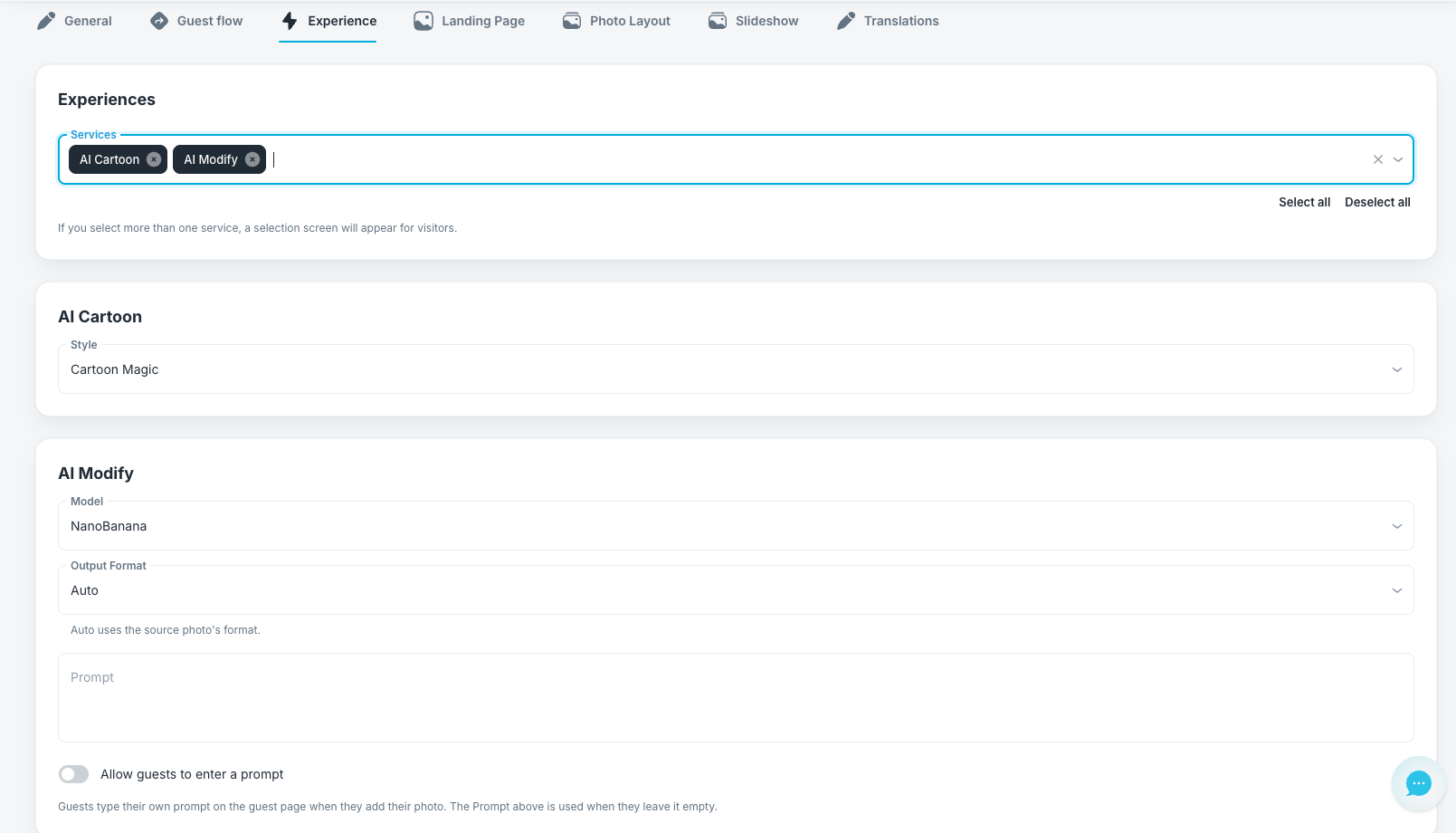
- Click Save Changes.
Note: The prompt you enter in the template is used when a guest leaves their prompt empty. Always fill in this field, so every guest gets a result even without typing anything.
Note: If you select more than one service, guests see a selection screen and choose their experience first.
What the Guest Sees
- The guest adds their photo on the guest page.
- The guest types a prompt describing the look they want, such as “dressed as royalty,” or leaves the field empty.
- The guest submits the photo, and Foto Master Cloud creates the result.
Before the Event
- Test a few prompts yourself on the live event link. The phone preview simulates AI results, so it does not show what a real prompt produces.
- Turn on moderation for public events. Guests write the prompt, so a result may not match your brand.
- Check your AI credits and daily AI budget. The template shows the estimated AI credits per photo.
Note: Guest prompts stay private. They do not appear in public reports.
And you’re good to go!
Was this helpful?
Related articles
How to Use the AI StylePop Feature in Selfie Wifi
The AI StylePop feature lets you transform photos into fun, creative, and fully stylized scenes. Guests can enjoy a variety of pre-made looks or even create their own custom styles
How to Use the Selection Screen in Selfie Wifi
The Selection Screen in Selfie Wifi allows you to offer multiple AI options within a single activation. Guests can choose their own experience (whether through AI Line2Life, AI Sty
Selfie Wi-Fi Overview
Selfie Wi-Fi lets guests join your event from their own phones. They scan your event QR code, open the experience in their phone’s browser, and follow the screens you set up in Fot
Selfie Wi-Fi: Getting Started
This guide walks you through setting up Selfie Wi-Fi for your first event, from Cloud configuration to having guests snap photos on their phones. Prerequisites Foto Master Cloud ac
Selfie Wi-Fi: Moderation Guide
Moderation lets you review guest photos before they reach the guest, the gallery, the slideshow, or the printer. Use it for public facing events where you cannot control what guest