
Selfie Wi-Fi Overview
Selfie Wi-Fi lets guests join your event from their own phones. They scan your event QR code, open the experience in their phone’s browser, and follow the screens you set up in Foto Master Cloud.
You decide what that journey looks like. Offer a free photo, collect guest details, sell photos through a connected payment provider, or ask for feedback after the result.
Note: Feature availability depends on your account, your active Selfie Wi-Fi access, and the rollout. Paid photos require a Pro Cloud account, and some AI experiences have additional requirements.
How Selfie Wi-Fi Works
Every guest follows the same path:
- The guest scans the event QR code or opens the event link.
- The guest moves through the screens you set up, such as a welcome message, consent, a form, or payment.
- The guest takes a photo, uploads one, or draws, depending on your template.
- Foto Master Cloud processes the image. If moderation is on, the result waits for your approval.
- The guest sees the approved result on their phone.
Key Features
Guest Flow:
- Screens: Welcome, Terms and consents, up to two Collection forms, Payment, Choose experience, Capture, Result, and Thank you.
- Starting flows: Free photo, Lead capture, Paid photo, Leads + paid photo, and Paid photo + survey.
- Saved flows: Save a flow once and reuse it across templates and events.
Guest Details and Consent:
Collect contact details and survey answers with up to two Collection forms. Each consent purpose is a separate choice for the guest.
Paid and Complimentary Photos:
Sell photos through your connected Stripe account or Shopify store. Paid photos require a Pro Cloud account. Use event vouchers to give guests free photos.
Private Results:
Each guest sees their own approved result on their phone, even when the public gallery is off.
AI Experiences:
Guests choose from the AI experiences enabled on your account and template. You can let guests type their own prompt for AI Headshot, AI Draw Me, Modify, and Combine.
Event Controls:
Set opening and closing times, a photo cap, a daily AI budget, and protected QR links for each event.
Account and License
- A Foto Master Cloud account with active Selfie Wi-Fi access.
- AI credits for AI experiences. Regular photos do not use AI credits.
- For paid photos: an active Pro Cloud account, a Selfie Wi-Fi seat, feature activation, and a ready Stripe or Shopify connection.
Platform Support
Guests use Selfie Wi-Fi in the web browser on their own phones.
Guest device: The guest’s own phone, in its web browser.
Internet: Required on the guest’s phone at the venue.
Languages: English, Spanish, French, German, Portuguese (Brazil), Korean, and Simplified Chinese.
Note: Text you write yourself stays in the language you wrote it in. Slideshow displays, printing, Photo Mosaic Wall, and Draw Me Bot run through their own software and settings.
Getting Started
- Go to Presets > Selfie Wi-Fi > Templates and open your template.
- Select the Guest flow tab.
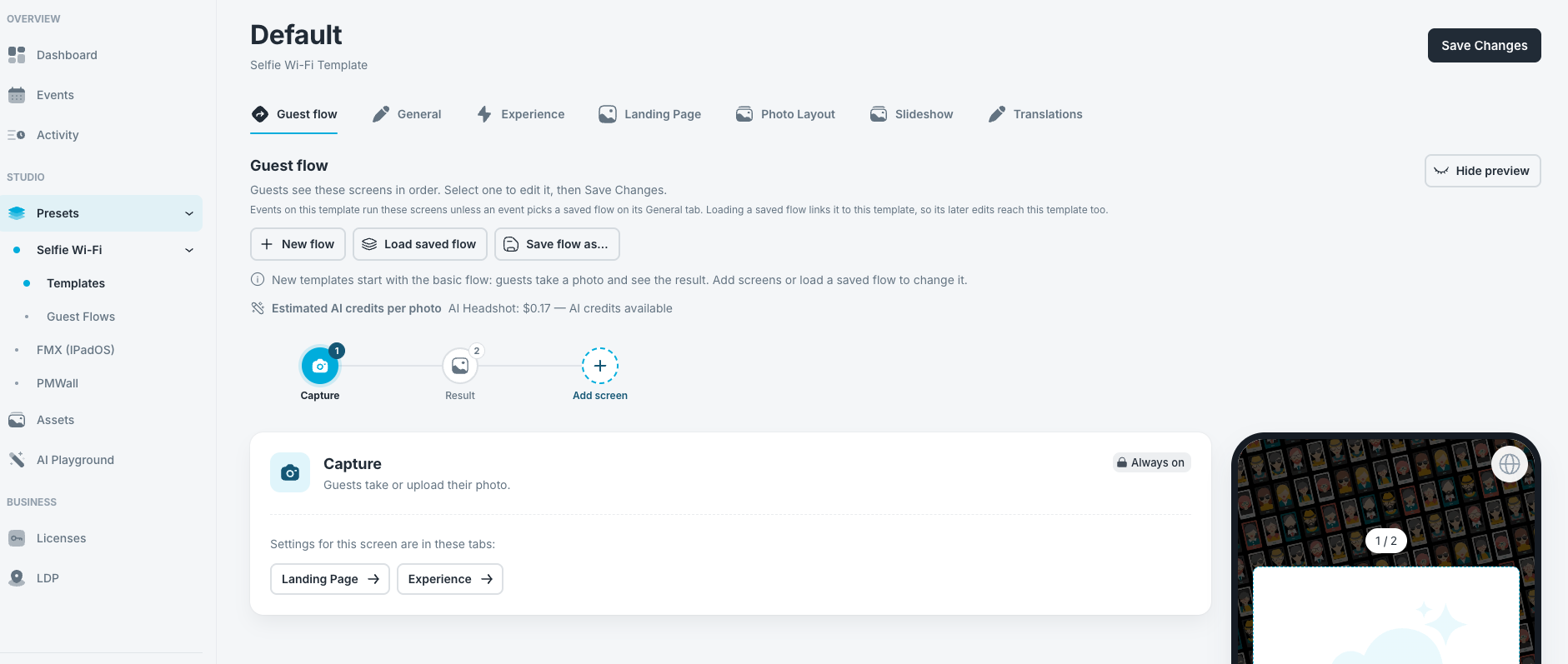
- Choose a starting flow.
- Walk through the phone preview.
- On your event’s General tab, turn on Selfie Wi-Fi and choose your template.
- Scan the event QR code with your own phone before guests arrive.
Was this helpful?
Related articles
How to Use the AI StylePop Feature in Selfie Wifi
The AI StylePop feature lets you transform photos into fun, creative, and fully stylized scenes. Guests can enjoy a variety of pre-made looks or even create their own custom styles
How to Use the Selection Screen in Selfie Wifi
The Selection Screen in Selfie Wifi allows you to offer multiple AI options within a single activation. Guests can choose their own experience (whether through AI Line2Life, AI Sty
Selfie Wi-Fi: Getting Started
This guide walks you through setting up Selfie Wi-Fi for your first event, from Cloud configuration to having guests snap photos on their phones. Prerequisites Foto Master Cloud ac
Selfie Wi-Fi: Moderation Guide
Moderation lets you review guest photos before they reach the guest, the gallery, the slideshow, or the printer. Use it for public facing events where you cannot control what guest
How to Use the Selfie Wi-Fi Software
Hi Foto Master Family, This guide walks through the Selfie Wi-Fi software, from initial setup to running a live activation. Note: This guide covers the Selfie WiFi Software, which