
LED Ring Connections
This guide explains how to connect the LED Ring to the Arduino Controller. As of LED Ring V3, the Arduino board is protected, refer to this article if the board needs to be accessed.
On the Arduino board (the small black box), if the port is at the bottom, connect the cables as follows:
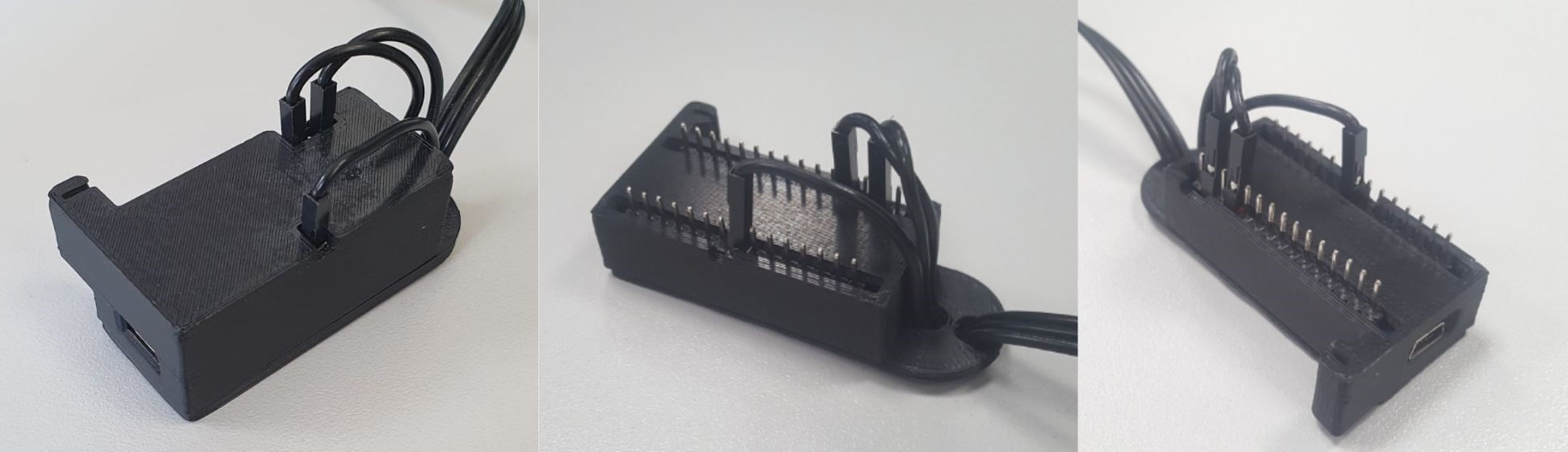
Cable Connections
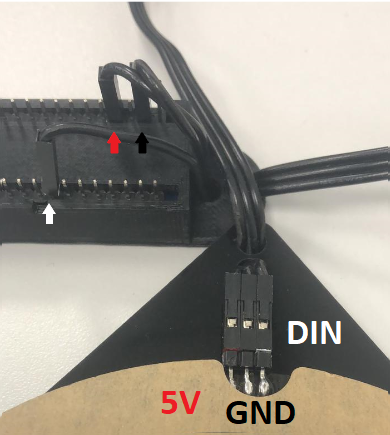
- Connect GND on the Ring → GND on the Board (Black cable)
- Connect 5V on the Ring → 5V on the Board (Red cable)
- Connect DIN on the Ring → D5 on the Board (White cable)
Was this helpful?
Related articles
Printer Comparison: DNP Models for Photo Booths
Overview DNP photo printers are widely used by photo booth operators because they are dependable, event-ready, and produce professional dye-sublimation prints. FMX supports printin
Choosing the Right Camera for Your Photo Booth
Your camera is the single most important component affecting photo quality in your booth. FMX supports Canon, Nikon, Sony, and GoPro cameras. FMX for Windows also supports USB webc
Camera Basics for Photo Booth Operators
You do not need to be a professional photographer to run a great photo booth, but understanding a few camera fundamentals will help you deliver consistently high-quality photos acr
FMX Supported Camera List
FMX supports Canon, Nikon, Sony, and GoPro cameras. FMX for Windows also supports UVC-compliant USB webcams, while FMX for iPadOS can use the iPad's built-in cameras. Support and s
Camera Basics: The Exposure Triangle
This video explains the exposure triangle (aperture, shutter speed, and ISO) and how each setting interacts to control the final look of your photo. Recommended for operators who w